common code
一般验证码的实现流程:
1、用户登录页面,通过img设置的src访问生成验证码图片的servlet;
2、servlet随机获取验证信息并保存到session中供验证使用,然后生成验证码图片,通过ImageIO.write(bufferimage对象,”JPG”,response.getOutpurStream())输出到页面;
3、生成图片所需的类:BufferedImage图像数据缓冲区;Graphics绘制图片;Color获取颜色;Random生成随机数;ImageIO输出图片;
4、获取用户提交的验证码信息,从session中获取正确的验证码进行比对;
kaptcha
Kaptcha 是一个可高度配置的实用验证码生成工具
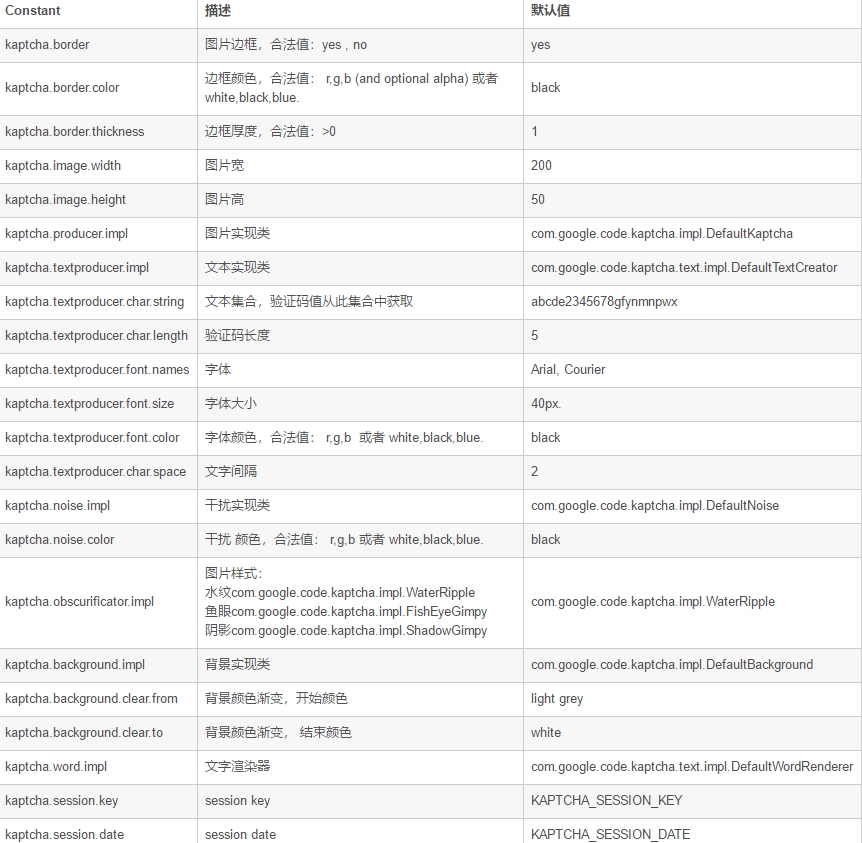
kaptcha的详细配置表
kaptcha所需jar包
简单实现实例
下面将演示通过配置Kaptcha框架来实现简单的验证实例,本文通过创建javaweb项目来进行演示;
首先先创建项目和导入jar包;
index.jsp页面创建:
<%@ page contentType="text/html;charset=UTF-8" language="java" %>
<!DOCTYPE html PUBLIC "-//W3C//DTD HTML 4.01 Transitional//EN" "http://www.w3.org/TR/html4/loose.dtd">
<html>
<head>
<meta http-equiv="Content-Type" content="text/html; charset=ISO-8859-1">
<title>简单验证码</title>
</head>
<body>
<form action="check.jsp">
<img src="randomcode.jpg">
<input type="text" name="code">
<input type="submit">
</form>

</body>
</html>
check.jsp验证页面的创建:
<%
	String k=(String)session.getAttribute(com.google.code.kaptcha.Constants.KAPTCHA_SESSION_KEY);
	String r=request.getParameter("code");
	if(k.equals(r)){
		out.println("true");
	}else{
		out.println("fasle");
	}
	out.print(k+"---"+r);
%>
web.xml文件配置:
<servlet>
		<servlet-name>Kaptcha</servlet-name>
		<servlet-class>com.google.code.kaptcha.servlet.KaptchaServlet</servlet-class>
	</servlet>
	<servlet-mapping>
		<servlet-name>Kaptcha</servlet-name>
		<url-pattern>/randomcode.jpg</url-pattern>
	</servlet-mapping>
效果演示:
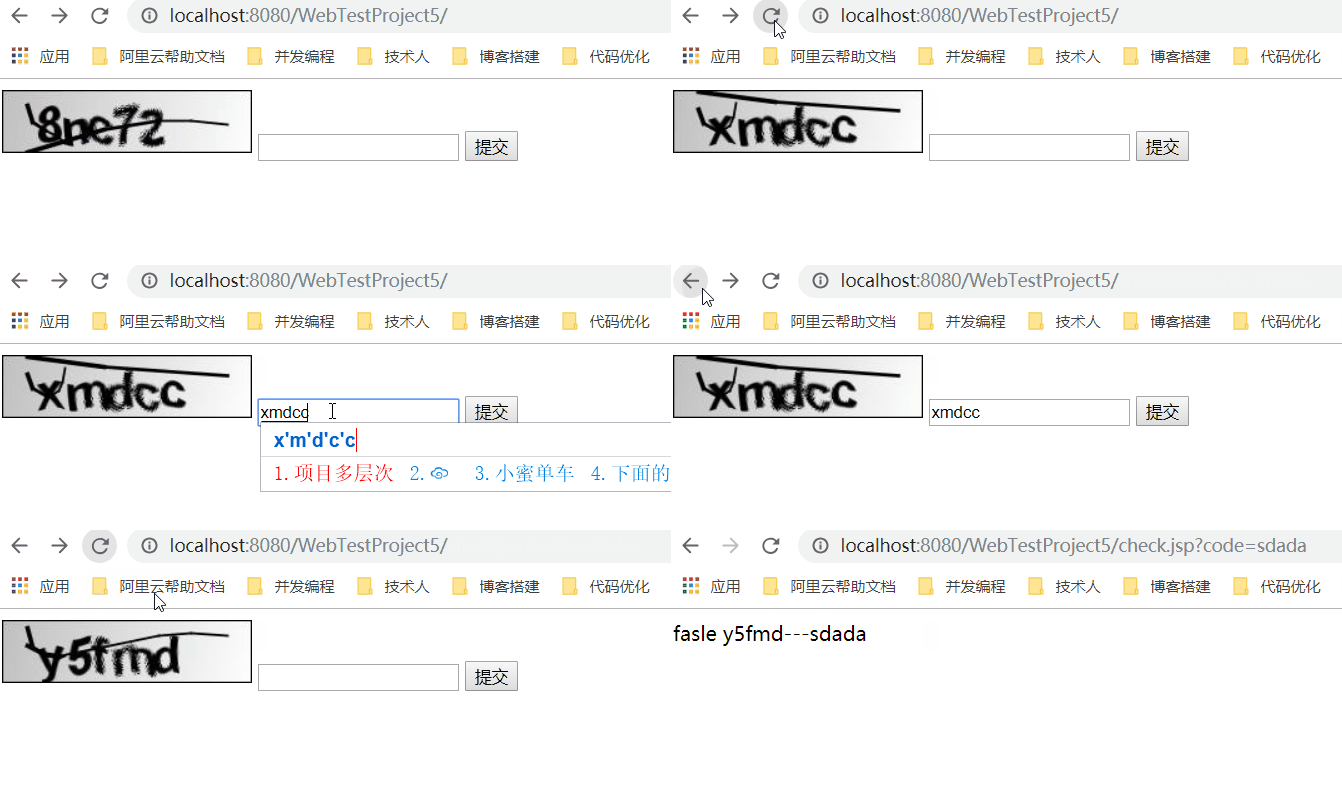
图片样式配置演示
鱼眼样式web.xml文件配置:
<servlet>
		<servlet-name>Kaptcha</servlet-name>
		<servlet-class>com.google.code.kaptcha.servlet.KaptchaServlet</servlet-class>
		<init-param>
            <description>
                图片样式: 水纹com.google.code.kaptcha.impl.WaterRipple
                鱼眼com.google.code.kaptcha.impl.FishEyeGimpy
                阴影com.google.code.kaptcha.impl.ShadowGimpy
            </description>
            <param-name>kaptcha.obscurificator.impl</param-name>
            <param-value>
                com.google.code.kaptcha.impl.FishEyeGimpy
            </param-value>
        </init-param>
	</servlet>
	<servlet-mapping>
		<servlet-name>Kaptcha</servlet-name>
		<url-pattern>/randomcode.jpg</url-pattern>
	</servlet-mapping>
效果演示:

算术验证码的改造
重写servlet类和配置新的web.xml文件。
servlet类:
public class KaptchaServlet
  extends HttpServlet
  implements Servlet
{
  private Properties props = new Properties();

  private Producer kaptchaProducer = null;

  private String sessionKeyValue = null;


  public void init(ServletConfig conf) throws ServletException {
    super.init(conf);


    ImageIO.setUseCache(false);

    Enumeration<?> initParams = conf.getInitParameterNames();
    while (initParams.hasMoreElements()) {

      String key = (String)initParams.nextElement();
      String value = conf.getInitParameter(key);
      this.props.put(key, value);
    }

    Config config = new Config(this.props);
    this.kaptchaProducer = config.getProducerImpl();
    this.sessionKeyValue = config.getSessionKey();
  }


  public void doGet(HttpServletRequest req, HttpServletResponse resp) throws ServletException, IOException {
    resp.setDateHeader("Expires", 0L);

    resp.setHeader("Cache-Control", "no-store, no-cache, must-revalidate");

    resp.addHeader("Cache-Control", "post-check=0, pre-check=0");

    resp.setHeader("Pragma", "no-cache");


    resp.setContentType("image/jpeg");


    String capText = this.kaptchaProducer.createText();

    String s1=capText.substring(0, 1);
    String s2=capText.substring(1, 2);
    int r=Integer.valueOf(s1).intValue()+Integer.valueOf(s2).intValue();


    req.getSession().setAttribute(this.sessionKeyValue, String.valueOf(r));


    BufferedImage bi = this.kaptchaProducer.createImage(s1+"+"+s2+"=?");

    ServletOutputStream out = resp.getOutputStream();


    ImageIO.write(bi, "jpg", out);

    try {
      out.flush();
    }
    finally {

      out.close();
    }
  }
}
web.xml文件:
<servlet>
		<servlet-name>Kaptcha</servlet-name>
		<servlet-class>it.mzt.servlet.KaptchaServlet</servlet-class>
		<init-param>
            <description>文本集合,验证码值从此集合中获取</description>
            <param-name>kaptcha.textproducer.char.string</param-name>
            <param-value>1234567890</param-value>
              <!--<param-value>abcde2345678gfynmnpwx</param-value>-->
            <!--<param-value>慕课网教程验证码实例</param-value> -->
        </init-param>
		 <init-param>
            <description>验证码长度 5</description>
            <param-name>kaptcha.textproducer.char.length</param-name>
            <param-value>2</param-value>
        </init-param>
	</servlet>
	<servlet-mapping>
		<servlet-name>Kaptcha</servlet-name>
		<url-pattern>/randomcode.jpg</url-pattern>
	</servlet-mapping>
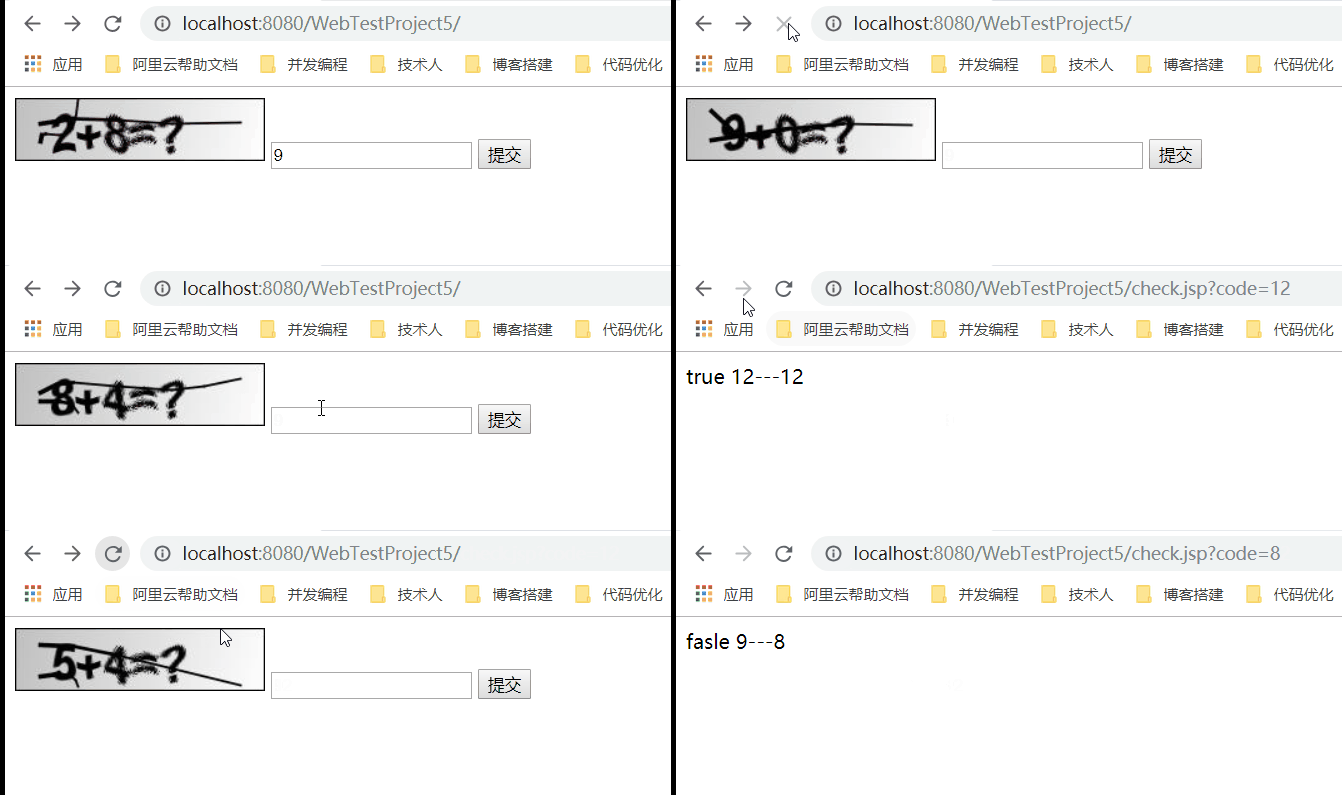
效果演示: